Table of Contents
Registering Your DLT Entity #
To ensure compliance with telecom regulations, follow these steps to register your DLT entity:
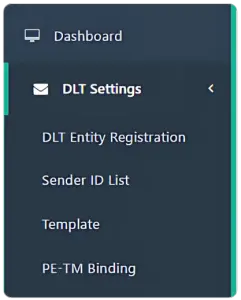
Step 1: Open the DLT Registration Page #
- Go to “DLT Settings” in the left menu.
- Click on “DLT Entity Registration”.
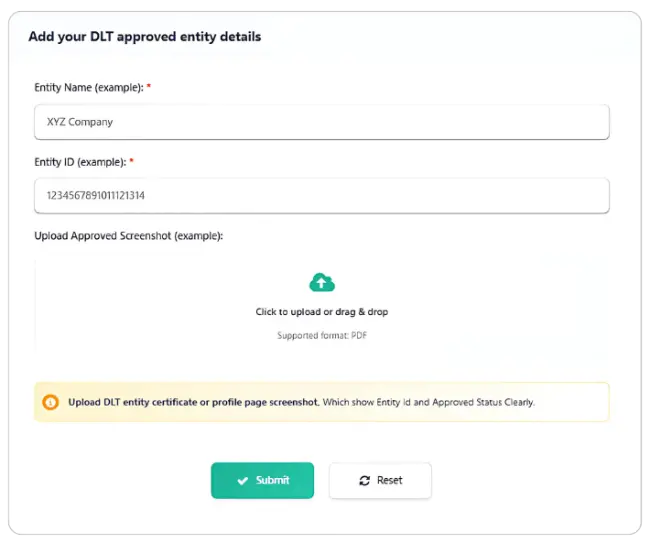
Step 2: Enter Entity Information #
- Entity Name – Enter your company or organization name (e.g., “XYZ Company”).
- Entity ID – Provide your 19-digit DLT Entity ID (e.g., 1234567891011121314).
- Additional Details – Fill in any other required fields as specified.
Step 3: Submit for Admin Review #
- Click the “Submit” button.
- Your registration will be sent for administrator approval.
- You will be notified once your entity is approved.
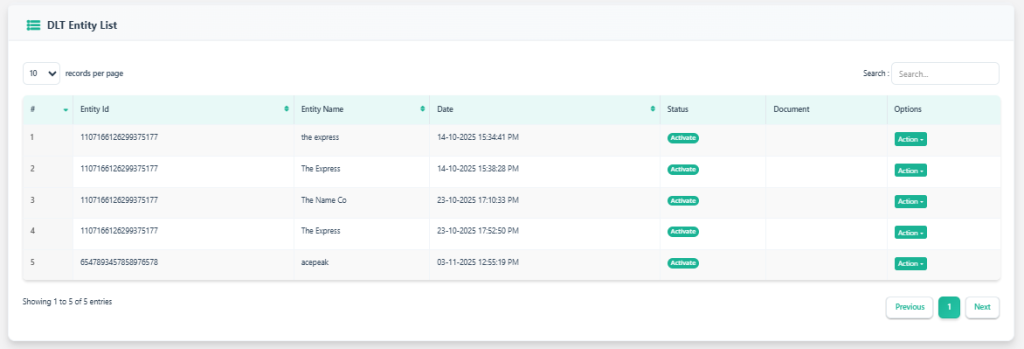
-
Open DLT Entity List to see all registered entities.
-
Review columns: Entity Id, Entity Name, Date, Status, Document, and Options.


