Table of Contents
PE-TM Binding (Principal Entity–Telemarketer Binding) #
To activate SMS services, you need to bind your DLT entity with approved templates and, if applicable, a telemarketer. Follow these steps:
Step 1: Open the PE-TM Binding Page #
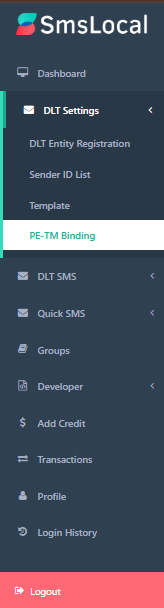
- Navigate to “DLT Settings” → “PE-TM Binding”.
Step 2: Set Up the Binding #
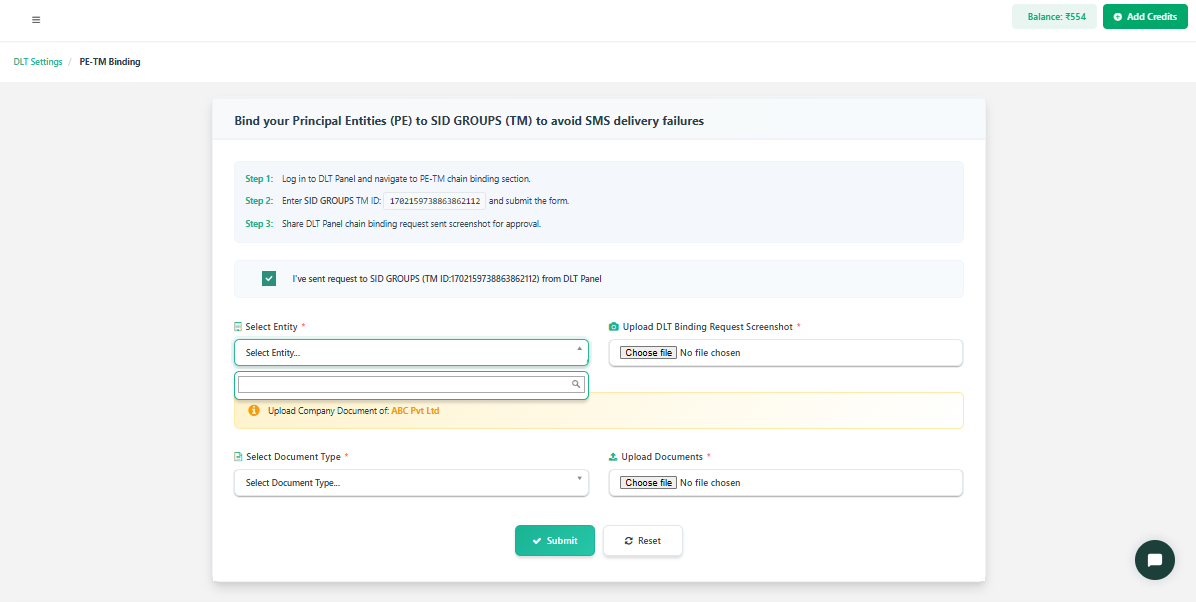
- Principal Entity – Select your registered entity.
- Template – Choose an approved message template.
- Telemarketer – Select the telemarketer (if required).
- Binding Details – Provide any additional required information.
Step 3: Submit for Approval #
- Double-check all details entered.
- Click “Submit” to send the binding request for approval.
Step 4: PE-TM Binding List #
-
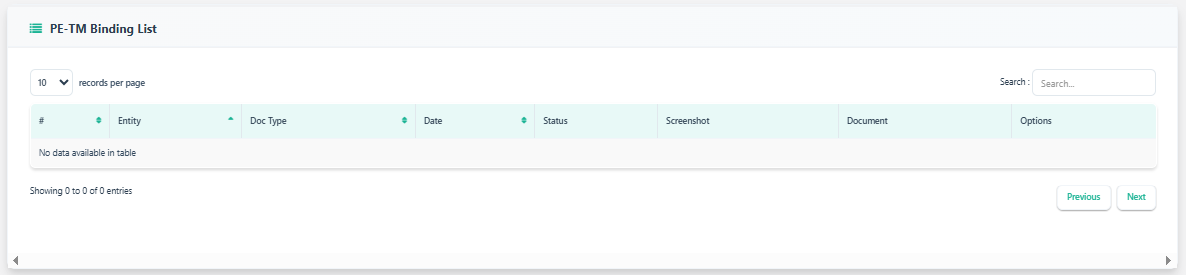
Open PE-TM Binding List to view bindings between entities.
-
The table shows Entity, Doc Type, Date, Status, Screenshot, Document, and Options.
-
If no records appear, the table will show “No data available in table” — meaning no bindings are added yet.
-
Use the records per page, Search field, and Previous/Next buttons to navigate and filter entries when present.


