
WhatsApp scams are among the most common digital frauds in India today — fake job offers, KYC fraud, investment schemes, OTP theft, digital-arrest calls, and impersonation attacks all arrive through WhatsApp every single day. This guide explains exactly how each type of WhatsApp scam works, how to identify it before it is too late, and what to do if you or a customer has already fallen victim.
Guidance in this article is aligned with the advisories of the Indian Cyber Crime Coordination Centre (I4C) and WhatsApp’s official safety resources.
Why scammers target WhatsApp
WhatsApp is the default personal communication channel for most Indians, which makes it uniquely powerful for fraudsters: a message on WhatsApp feels more personal and urgent than an email, it arrives with a notification that demands attention, and it can carry images, documents, and links that look completely official.
Unlike SMS, WhatsApp shows profile pictures and display names — both of which can be faked. A scammer can set a bank’s logo as their picture, name themselves “SBI Customer Care”, and send a message that looks almost identical to a real bank communication. On a small phone screen, most people can’t tell the difference quickly enough.
The most common WhatsApp scams in India
1. KYC fraud
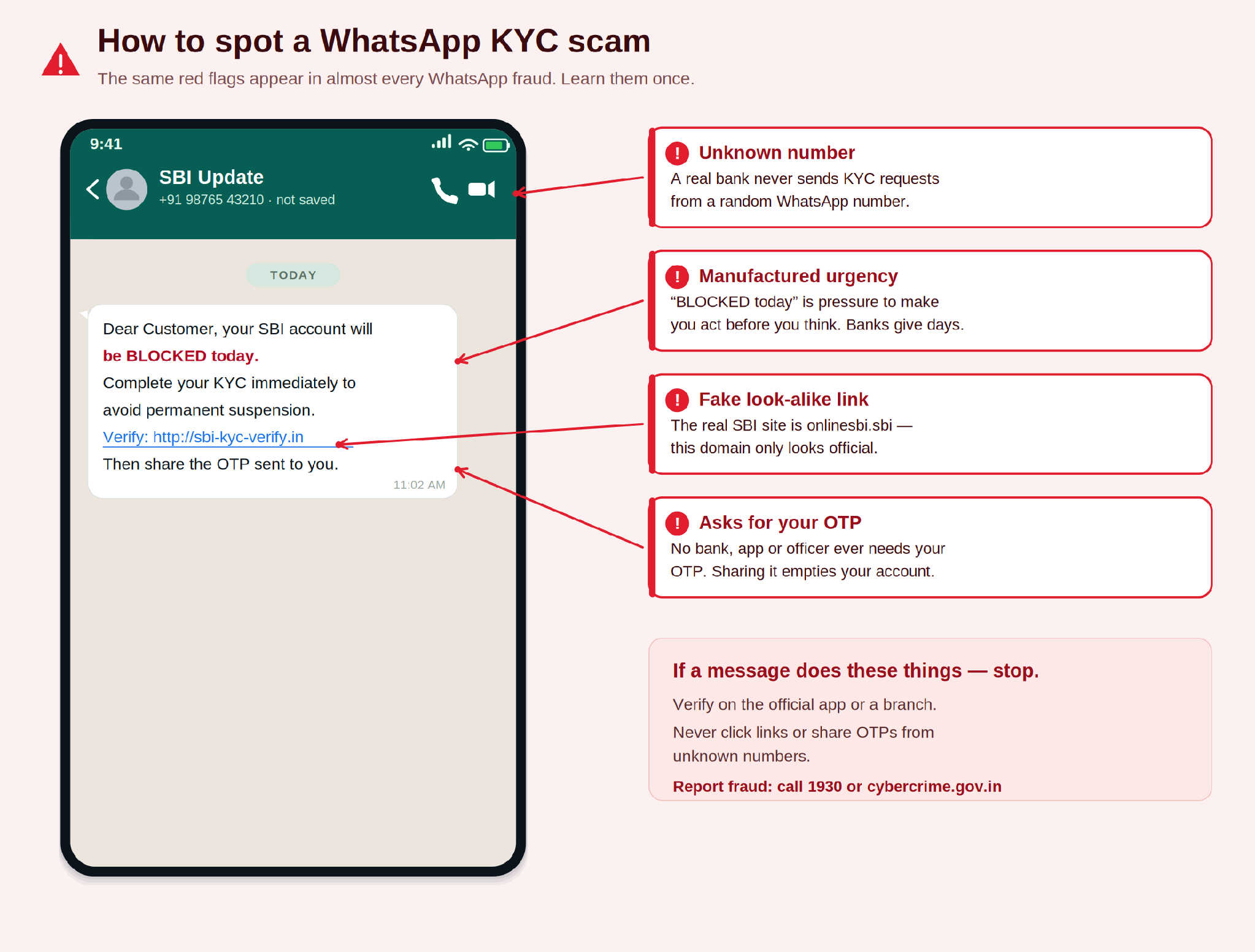
The most widespread WhatsApp scam in India. You receive a message claiming your bank account, UPI ID, or wallet will be blocked unless you complete a KYC update immediately. It manufactures panic, then asks you to share your Aadhaar, PAN, account details, or OTP — sometimes via a link, sometimes by direct reply.
How to identify it:real banks and regulated institutions never ask for OTPs, full account numbers, or passwords over WhatsApp. Ever. A genuine KYC request comes through a branch visit, the institution’s own verified app, or registered email — not a WhatsApp message from an unknown number.
2. Fake job offers
A message offers high-paying remote work — task-based jobs, product reviewing, video-liking, stock tips. Early tasks are simple and the victim is even paid small amounts to build trust. Then comes a “registration fee”, “security deposit”, or “withdrawal unlock fee” — and the money disappears.
How to identify it:no legitimate employer asks you to pay to start working. If you get paid first and are then asked to pay something back, it’s a scam. Verify any company name on the MCA portal (mca.gov.in) before sharing personal information.
3. Investment and trading scams
Scammers add victims to WhatsApp groups posing as stock or crypto investment communities. A “financial expert” or “SEBI-registered advisor” shares tips and fake screenshots of huge returns, then pushes members to invest through a fraudulent platform. Deposited money can’t be withdrawn — the platform vanishes or adds endless withdrawal fees.
How to identify it: SEBI-registered advisors are listed on the SEBI website (sebi.gov.in) — verify before trusting anyone. Guaranteed returns are illegal under Indian securities law, and being added to a group you never asked to join is itself a red flag.
4. Impersonation — the family-emergency scam
A message from an unknown number: “Beta, mera phone kho gaya, ye naya number hai. Please ₹5,000 bhej do, emergency hai.” It appears to be from a parent, sibling, or close relative — the scammer has researched enough on social media to use the right language and context.
How to identify it:always call the known number of the family member directly before sending any money. If they’re genuinely unreachable, call another relative to verify. Never transfer money based on a WhatsApp message from a new number, however convincing.
5. OTP theft
Someone claiming to be from your bank, TRAI, or a government agency says you must verify your account by sharing the OTP you’re about to receive. The instant you share it, they use it to log into your bank, UPI, or wallet and clear the balance.
How to identify it:no bank, payment app, or government body will ever ask you to share an OTP. The whole purpose of a one-time password is to stay private. The second someone asks for an OTP, it’s a scam — full stop.
6. Screen sharing and remote access
A scammer posing as support asks you to install a screen-sharing app (AnyDesk, TeamViewer, Quick Support) to “fix your account”. Once you share your screen, they see every OTP, PIN, and password you enter — many victims have watched their savings drain in real time.
How to identify it: real bank support never needs remote access to your phone. If any agent asks you to install an app or share your screen, end the call immediately and report the number.
7. Digital arrest scams
One of the fastest-growing frauds in India. Scammers pose as police, CBI, customs, or income-tax officers on a WhatsApp video call — often with a fake uniform and a staged “police station” background. They claim you’re implicated in money laundering or a parcel of contraband and that you’re under “digital arrest”, then demand payment to “clear your name” and keep you on the call so you can’t verify.
How to identify it:there is no such thing as a “digital arrest”. No genuine Indian law-enforcement agency arrests, interrogates, or collects fines over a WhatsApp video call. Disconnect, and report it on 1930.
8. Malicious APK and fake-invitation files
You receive a file that looks like a wedding invitation, an e-challan, a bank statement, or a courier-tracking app — but it’s an Android APK. Installing it loads malware that can read your SMS (including OTPs), intercept banking apps, and quietly authorise transactions.
How to identify it:never install an APK sent over WhatsApp. Legitimate apps come only from the Google Play Store or Apple App Store. A “wedding invite” or “statement” that’s an app to install is always a scam.
9. QR-code and payment-request scams
A buyer, landlord, or “refund” agent sends a QR code or a UPI collect request and tells you to scan or approve it to receive money. Scanning a QR code or approving a collect request authorises a payment out of your account — you never receive money by scanning a code.
How to identify it:you scan a QR code or approve a UPI request only to send money, never to receive it. Anyone telling you to scan “to get paid” is trying to debit your account.
Quick reference — the hook and the tell for each scam:
| Scam type | The hook | The tell |
|---|---|---|
| KYC fraud | Account blocked unless you update KYC now | Asks for OTP, account number, or Aadhaar over WhatsApp |
| Fake job offer | High-paying work from home — pay to register | Asks you to pay before earning |
| Investment scam | Guaranteed returns, SEBI advisor in a group | Not on SEBI registry; money can't be withdrawn |
| Impersonation | Family member on a new number needs money | Unknown number; can't verify on their real number |
| OTP theft | Bank/TRAI asking for an OTP to verify | Anyone asking for an OTP you received is a scammer |
| Screen sharing | Support agent needs to see your screen | No real support needs remote access |
| Digital arrest | Police/CBI video call, you're 'under arrest' | No such thing — agencies don't arrest over a call |
| Malicious APK | Wedding invite / e-challan / statement file | It's an .apk — never install apps from WhatsApp |
| QR / payment request | Scan this QR / approve to receive money | Scanning or approving only sends money out |
The one rule that catches almost everything: if a WhatsApp message triggers urgency and asks for money, personal data, or an OTP — stop, and verify through an official channel before doing anything.
Universal warning signs of a WhatsApp scam
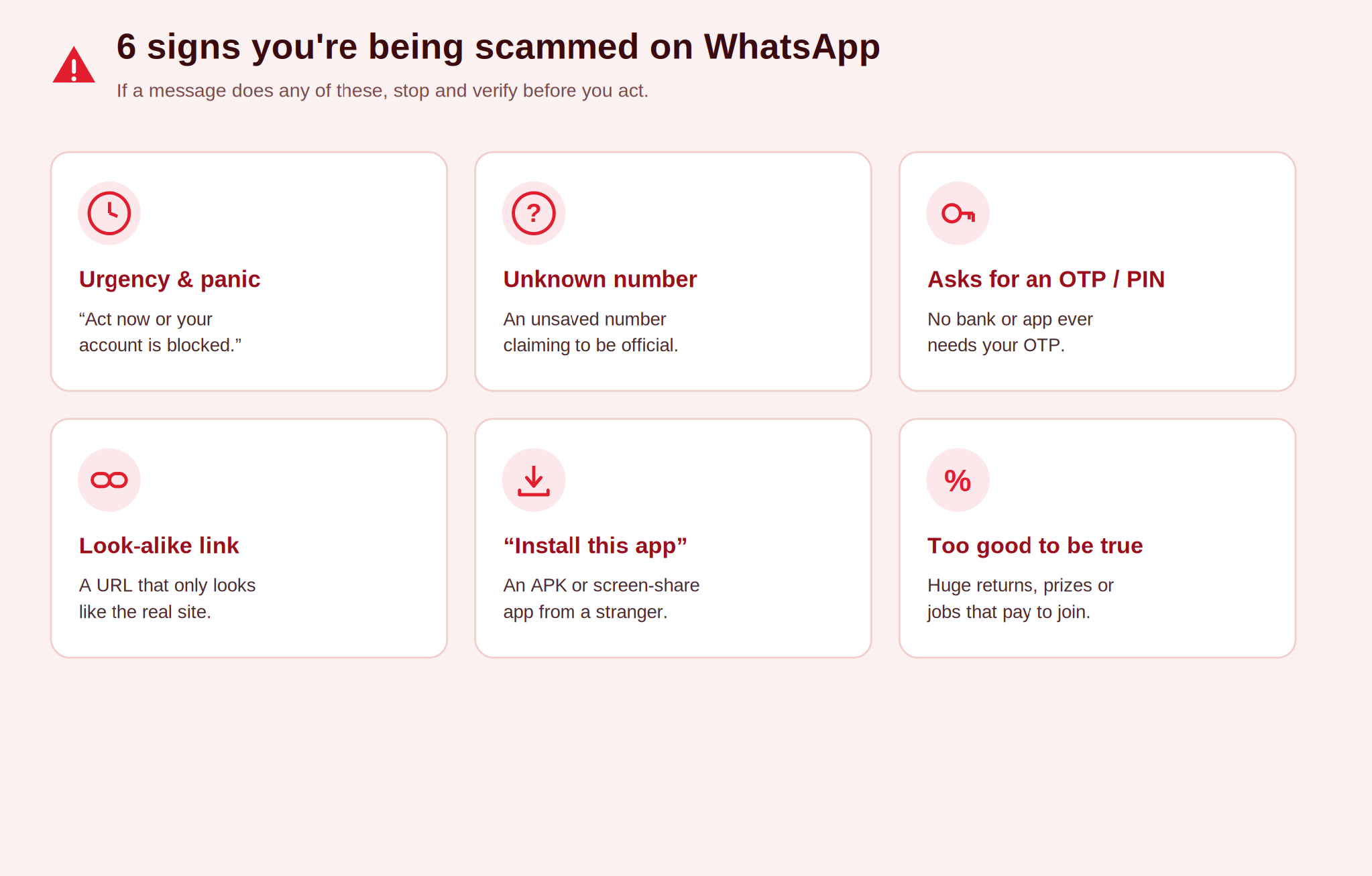
Across every scam type, the same psychological patterns repeat. Learn to spot these and you’ll catch the vast majority of attempts before any damage is done:
- Urgency and panic. “Your account will be blocked in 2 hours.” Scammers use urgency to stop you thinking. A real bank gives you days, not minutes.
- Unknown numbers claiming to be official. Real banks and government departments use registered headers, official apps, or verified email — not random +91 numbers.
- Requests for OTPs, passwords, or PINs. These are never shared with anyone — not bank staff, not family, not anyone.
- Links to look-alike websites. A real bank’s link matches its official domain exactly. Scam links add extra characters — sbi-kyc-update.com, icicibankverify.net, and similar.
- Requests to install apps or APK files. AnyDesk, TeamViewer, or any APK gives remote access or installs malware. No legitimate company needs this.
- Too-good-to-be-true offers. ₹5,000/hour for liking videos, 50% monthly returns, lottery wins you never entered — these do not exist.
For businesses: protecting your customers from impersonation
If your business communicates with customers on WhatsApp, scammers may impersonate you — creating fake accounts with your logo and name to send your customers fake refunds, support, or offers. Here’s how to protect them and your brand:
- Use the official WhatsApp Business API with a verified green tick. The verified badge tells customers Meta has authenticated your account. Scammers can’t fake it.
- Publish your official WhatsApp number prominently. Put your verified number on your website, app, invoices, and packaging so customers know which number to trust. Any other number claiming to be you is an impersonator.
- Tell customers what you’ll never ask for. Add a line to your transactional messages: “We will never ask for your OTP, password, or full card number on WhatsApp.” This one sentence prevents most impersonation attacks.
- Report impersonator accounts immediately. Document the fake account with screenshots and report it through WhatsApp’s Business Support channel.
What to do if you’ve been scammed
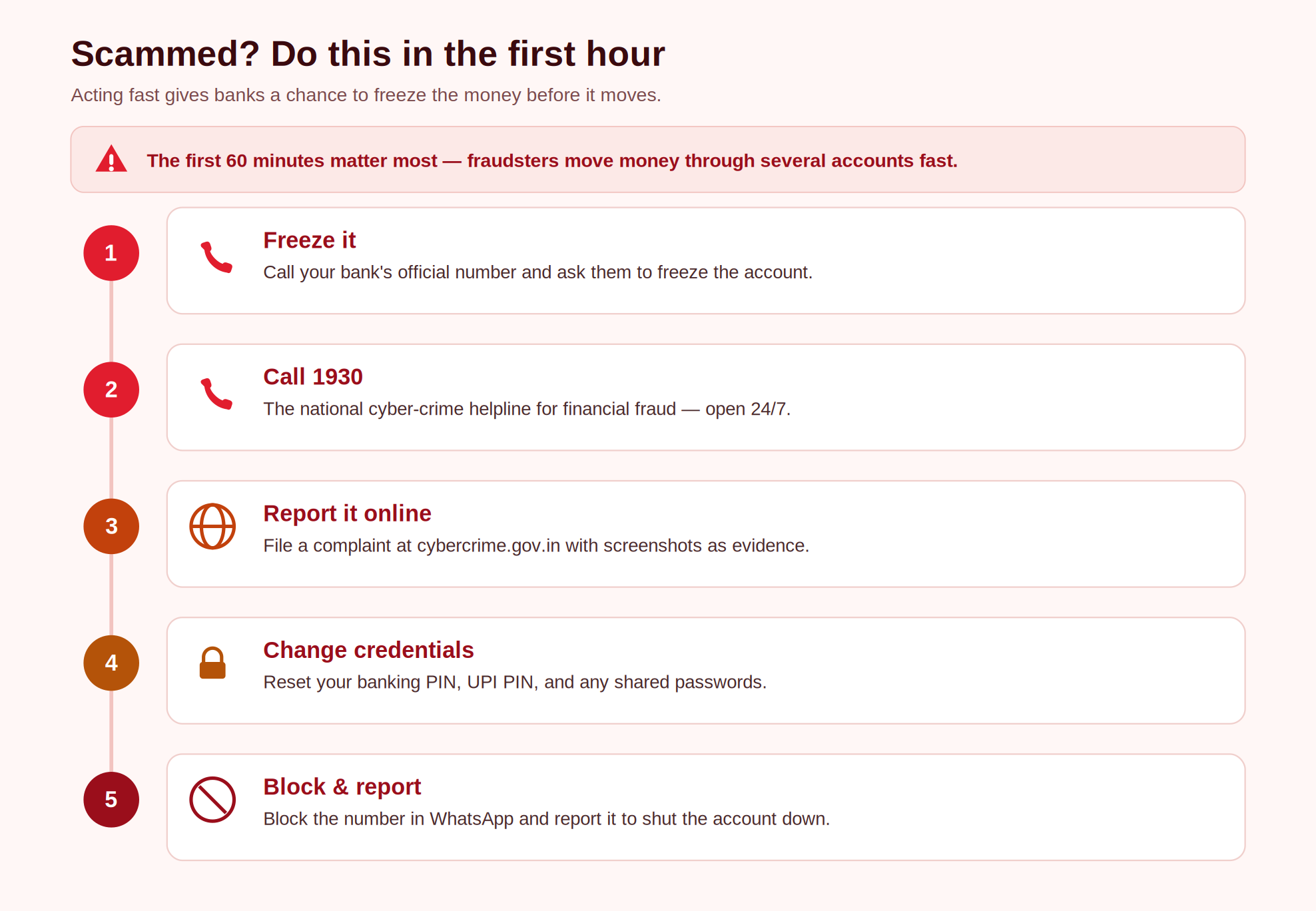
If you’ve already shared sensitive information or transferred money, act within the first hour — that’s the window where banks can sometimes freeze a transaction:
- Call your bank immediately on their official customer-care number (printed on your card or website). Ask them to freeze your account and reverse recent transactions.
- Call the Cyber Crime Helpline: 1930. This 24-hour government helpline is specifically for financial cyber fraud. The earlier you call, the higher the chance of recovering funds.
- File a complaint at cybercrime.gov.in. The National Cyber Crime Reporting Portal lets you file online. Keep screenshots of the WhatsApp conversation as evidence.
- Change all passwords immediately. If you shared credentials or an OTP was used, change your banking PIN, UPI PIN, email password, and anything using the same credentials.
- Block and report the number on WhatsApp. Open the chat, tap the number, then Report and Block — this helps WhatsApp shut the scammer down faster.
The key vulnerability in WhatsApp fraud is not technology — it’s urgency. Slow down, verify, and never share an OTP with anyone.
Frequently asked questions
Can a scammer access my phone just by sending a WhatsApp message?
Not from a text message alone. The danger comes when you click a malicious link (which can install malware or open a phishing page) or voluntarily install an app or APK the scammer recommends. Don’t click links from unknown numbers and never install apps on a stranger’s say-so.
Someone added me to a WhatsApp group I didn’t join. Is it a scam?
It may be. Being added without consent — especially to a group promoting investments, jobs, or giveaways — is a common scam setup. Leave immediately and don’t interact. Prevent it in future via WhatsApp Settings → Privacy → Groups → “My Contacts Only”.
I got a WhatsApp message saying I won a lottery. Is it real?
No. No legitimate lottery notifies winners by WhatsApp from an unknown number. These always ask for a “processing fee” or personal details to “release” the winnings. Block and report.
Is a “digital arrest” real?
No. There is no legal concept of digital arrest in India. No police, CBI, or tax officer will arrest, interrogate, or collect a fine over a WhatsApp video call. Disconnect and report it on 1930.
Can I get my money back after a WhatsApp scam?
Possibly, if you act fast. Banks have fraud teams that can sometimes freeze a receiving account before the money moves, and the 1930 helpline has recovered funds for people who called within the first hour. The longer you wait, the lower the odds — fraudsters move money through multiple accounts within minutes.
