
Send compliant SMS campaigns in minutes — no developers required.
Upload a list, pick a DLT-registered template, preview the message, and send. Quick SMS is built for ops, marketing, and support teams who need to move fast without waiting on an engineering sprint.
Used every day by ops, marketing, and support teams across India
The dashboard does the work your developers used to.
Most SMS campaigns do not need an engineer. They need a clean form, a safe template library, and honest delivery reports. Quick SMS is built around that idea — with the same compliance and delivery backbone as the rest of SMSLocal.
Zero code to send
A clean browser-based composer your non-technical team can learn in ten minutes.
DLT template library
Pick from pre-approved templates, customise variables, and stay inside TRAI DLT rules by default.
CSV import & variables
Upload your recipient list and merge per-user variables like name, order ID, or link in one step.
Live delivery reports
Watch queued, delivered, failed, and pending counts update in real time as your send progresses.
Scheduled sends
Pick a future date and time, or send immediately. Campaigns run even if your browser is closed.
Compliance on rails
DND filtering, opt-out handling, sender ID validation, and audit trails are applied to every send.
From list to delivery in four clicks.
- Step 1
Upload your list
Drag and drop a CSV, paste numbers, or pick an existing contact segment from your dashboard.
- Step 2
Pick a template
Choose a DLT-approved template, fill in variables, and preview exactly what each recipient will see.
- Step 3
Review and schedule
Confirm the sender ID, recipient count, cost estimate, and send time — immediately or on a schedule.
- Step 4
Send and track
Watch the live delivery report. Download a detailed CSV once the campaign is complete.
All the guardrails a compliance team expects, without the friction.
Composing
- Drag-and-drop CSV upload with live column mapping and validation.
- Variable merging with {{name}}, {{order_id}}, {{url}}, and custom keys.
- Character counter with SMS part breakdown and Unicode / GSM-7 detection.
- Shortlinks with branded domains and per-link click tracking.
Compliance
- Automatic DND scrubbing aligned to TRAI rules before the send goes out.
- DLT header and template validation with inline error messages.
- Built-in opt-out keyword handling and suppression lists.
- Complete audit log of who sent what, when, and to whom.
Reporting
- Real-time delivery counters — queued, sent, delivered, failed, expired.
- Per-number delivery status with operator-level reason codes.
- CSV export with recipient, status, timestamp, and retry history.
- Campaign-level dashboards filterable by date, sender ID, and template.
A composer your whole team can share safely.
Roles & permissions
Admin, editor, and viewer roles. Approvers can gate sends above a cost or recipient threshold.
Reusable templates
Save message drafts and variable mappings as reusable templates across the workspace.
Campaign folders
Organise sends by brand, region, or team and pull aggregated reports per folder.
Schedule windows
Enforce send windows per business unit so campaigns only go out within allowed hours.
Send approvals
Require a second reviewer for sends that exceed a configured size or cost threshold.
Two-way inbox (add-on)
Capture replies to two-way numbers in a shared inbox your support team can triage.
Why teams pick Quick SMS over spreadsheets and DIY tools.
| Feature | SMSLocal Quick SMS | Generic SMS dashboards | Spreadsheet + dev team |
|---|---|---|---|
| DLT workflow built in | Yes, inline validation | Partial, often manual | Manual, error-prone |
| CSV import with variables | Drag-and-drop, column mapping | Varies by vendor | Manual merges in code |
| Live delivery reports | Real-time counters + CSV | Often delayed | Requires custom tooling |
| Roles, approvals, audit log | Built in | Usually upsell | None |
| Time from signup to first send | Minutes | Hours to days | Days to weeks |
| India-based product support | Yes, product-trained | Often offshore | Your own team |
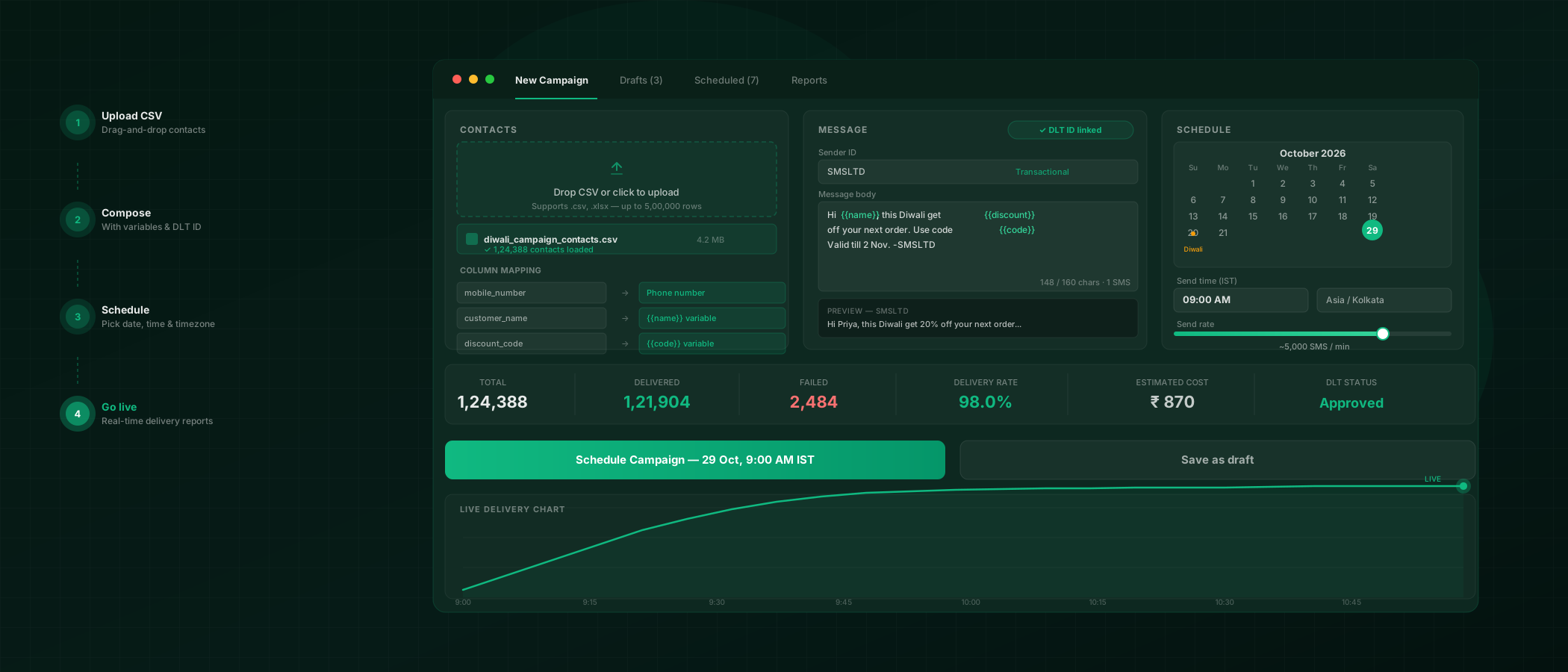
Upload, compose, schedule — live in the time it takes to make tea.
Quick SMS is built for the teammate who doesn't write code but still needs a million messages out by Friday.
What Quick SMS is best at.
Promotional campaigns
Sales, launches, seasonal offers, and re-engagement blasts to segmented contact lists.
Transactional ops alerts
Order confirmations, delivery updates, payment reminders, and service notifications.
Internal announcements
Staff roster changes, emergency alerts, and training reminders to internal teams.
Support follow-ups
CSAT surveys, ticket updates, appointment reminders, and post-resolution check-ins.
Minutes
from signup to your first delivered campaign
One CSV
upload, preview, and send from the same screen
Sub-1s
typical SMS delivery latency on major Indian carriers
Per-number
live delivery status, exportable as CSV
Quick SMS, answered.
Do I need a developer to use Quick SMS?
No. Quick SMS is a browser-based dashboard designed for ops, marketing, and support teams. You upload a list, pick a template, preview, and send — no code required.
What do I need before my first send?
A registered DLT header, an approved template, and a CSV list of recipients. Our onboarding team helps with DLT registration on every paid plan.
Can I schedule campaigns for later?
Yes. You can schedule a send for any future date and time, and the campaign will run on our infrastructure even if your browser is closed.
How are failed deliveries handled?
Failed messages are retried automatically per route policy, and the final per-number status is surfaced in the live delivery report and the downloadable CSV.
Can I run two-way conversations from Quick SMS?
Quick SMS is primarily outbound. Two-way SMS inbox is available as an add-on where replies to a two-way-enabled number are routed to a shared inbox.
Is Quick SMS included in every SMSLocal plan?
Yes. Every SMSLocal plan includes the Quick SMS dashboard alongside the API, developer tools, and compliance features. Check the pricing page for included volumes.
What does bulk SMS cost when sent through Quick SMS?
Same rates as our API — billed from your wallet with no monthly minimum or setup fee. See the pricing page for current per-message rates.
For teams who move faster than their dev team.
Quick SMS pairs naturally with RCS rich cards, WhatsApp broadcasts, and bulk SMS for ops, marketing, and support.
Explore products
RCS Business Messaging
Verified, branded rich cards on Jio, Airtel, and Vi — with SMS fallback.
Bulk SMS
DLT-compliant campaigns with AI routing and wrong-number detection.
WhatsApp Business API
Broadcasts, AI agents in 8 Indian languages, and a visual flow builder.
OTP & Transactional SMS
Priority routes, sub-second delivery, and a ship-today API.
See it in your industry
Send your first campaign today.
Sign up for free, import a list, and send a test campaign in minutes. No credit card required to start.