Bulk WhatsApp messaging lets businesses send thousands of messages to opted-in customers at once — order updates, offers, reminders, and campaigns — all on the official WhatsApp Business API. This guide explains how it actually works in 2026, what it costs, and how to do it without getting your number banned.
What bulk WhatsApp messaging actually is
Bulk WhatsApp messaging is the ability to send a single message — an order confirmation, a promotional offer, an event reminder — to a large list of contacts simultaneously, through the WhatsApp Business Platform. Each recipient gets an individual message in their personal WhatsApp inbox, not a group chat.
The key word is official. Meta (WhatsApp's parent company) controls exactly who can send bulk messages and on what terms. You access this through a Meta-approved Business Solution Provider (BSP) — a company like SMSLocal that has a direct API connectionto WhatsApp's infrastructure.
API vs. Business App vs. unofficial tools
There are only three ways to send to many contacts at once, and they are not equally safe. Here's how they compare:
| WhatsApp Business API | Business App (broadcast lists) | Unofficial tools / extensions | |
|---|---|---|---|
| Best for | Serious bulk + automation | Tiny lists, sent manually | “Quick hacks” — don't |
| Scale | 250 → unlimited/day (tiered) | 256 saved contacts per list | Varies (until you're banned) |
| Automation | Yes — templates, scheduling, API | None | Yes, but against the rules |
| Ban risk | Low when compliant | Medium (manual, easy to trip spam) | Very high — often within minutes |
| Compliance | Meta-approved | Allowed but limited | Violates Meta's Terms of Service |
| Verdict | The only way to scale safely | Fine for <256, by hand | Never use |
How it works — from contact list to delivered message
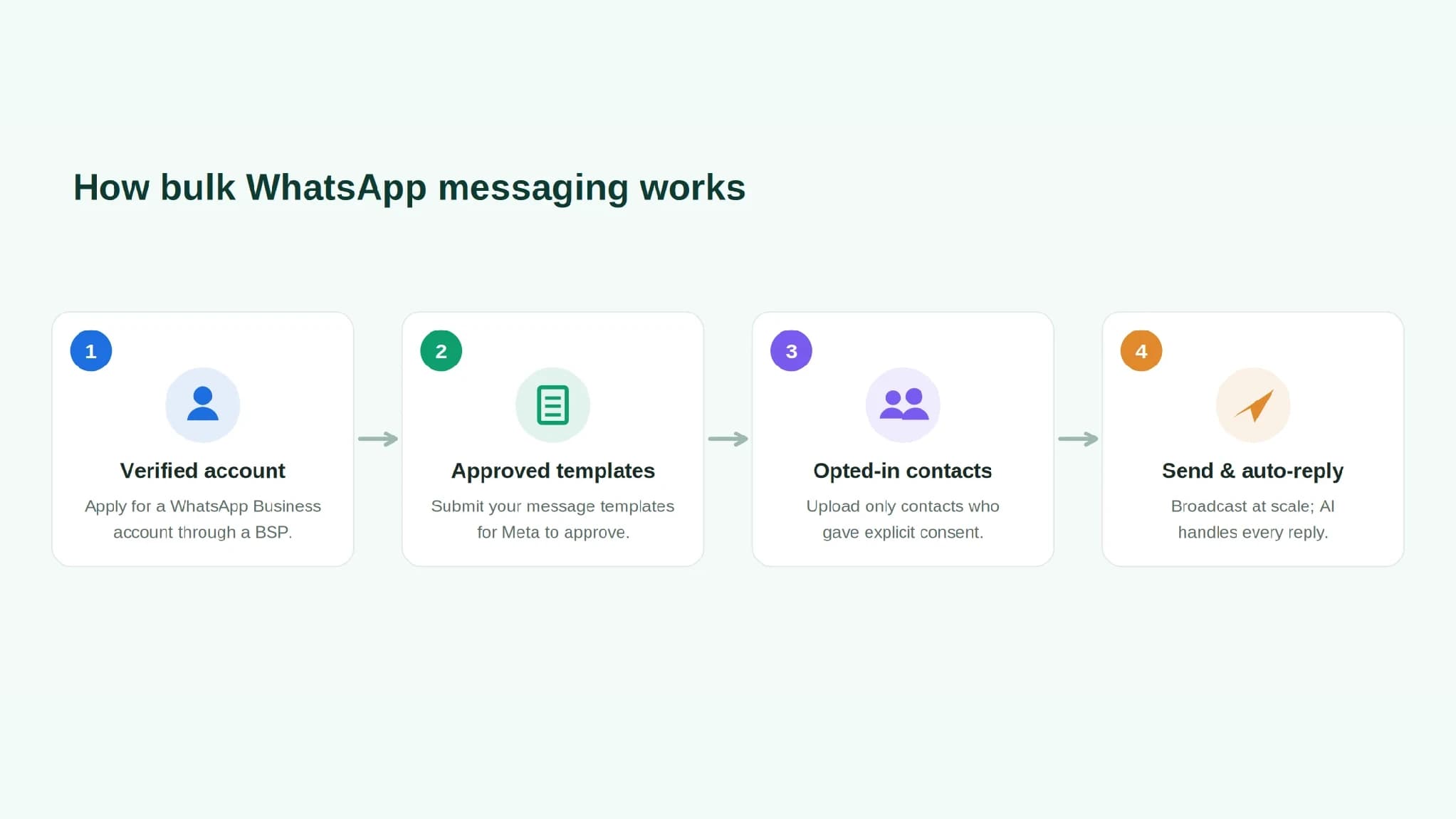
Every bulk sender goes through the same four steps, regardless of volume:
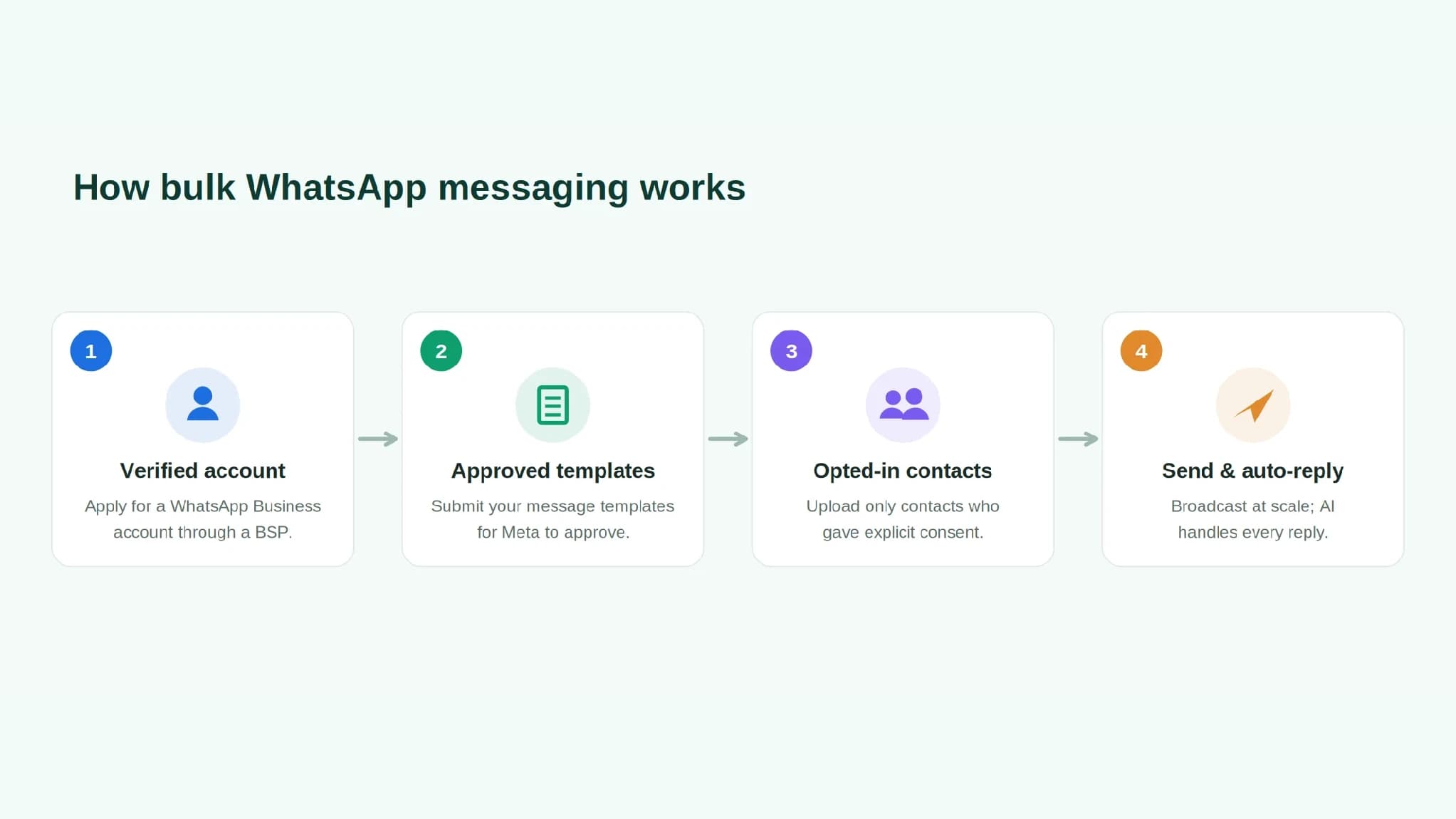
- Build a verified sender account. Your business applies for a WhatsApp Business Account (WABA) through a BSP. Meta verifies your business, approves a display name, and assigns a messaging tier that controls how many unique users you can message per day.
- Create and submit message templates. Every outbound bulk message must use a pre-approved template. You write it, submit it for Meta review (usually 24–48 hours), and once approved you can use it in campaigns. Templates support variables for personalisation — name, order ID, date.
- Upload your opted-in contact list.The most legally sensitive step. WhatsApp requires every recipient to have explicitly consented to receive messages from your business. Sending to contacts who haven't opted in is a Terms violation and the fastest way to get banned.
- Launch the campaign and handle replies. Messages go out through the API, and replies arrive back in your inbox— which is where a well-configured platform like SMSLocal lets agentic AI handle them automatically, so a broadcast doesn't create a support backlog.
What kinds of messages you can send
WhatsApp templates fall into three categories, each with different rules about when you can send them:
| Category | When you can use it | Examples |
|---|---|---|
| Utility | After the customer has transacted or signed up | Order confirmation, shipping update, payment receipt, appointment reminder |
| Authentication | Any time, for identity verification | OTP, login code, 2FA confirmation |
| Marketing | To opted-in contacts, within messaging limits | Promotional offers, product launches, seasonal campaigns, back-in-stock alerts |
Marketing templates require explicit opt-in. Utility and authentication templates are easier to send because the customer already initiated a transaction.
Messaging limits and tiers in 2026
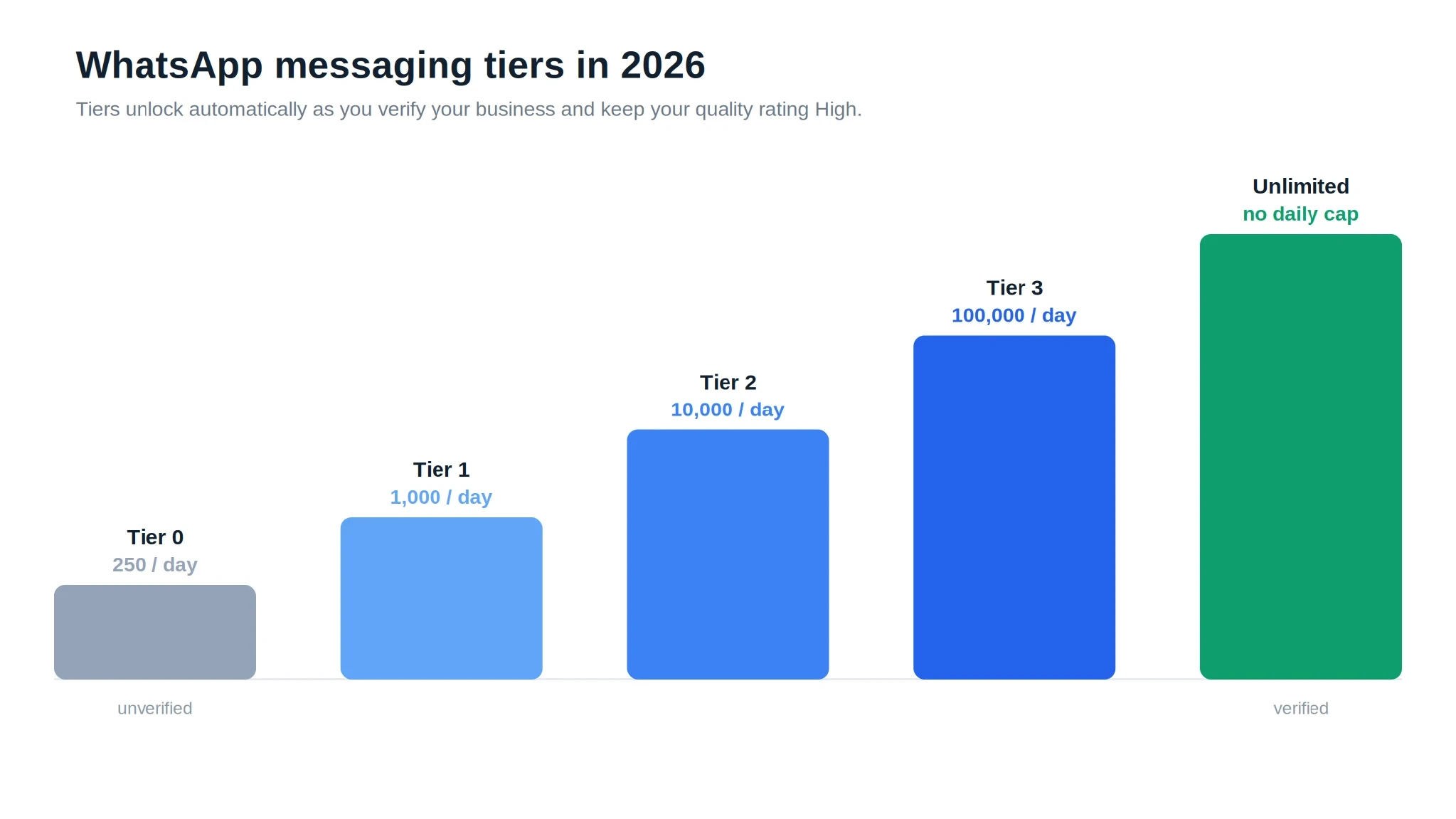
WhatsApp controls how many messages you can send through a tiered limit system tied to your quality rating — and the rules changed in 2025–26, so older guides are out of date. The current picture:
- Tier 0 (unverified): around 250 unique users per 24 hours. New, unverified accounts no longer start at 1,000 — verification is what unlocks the higher tiers.
- Tier 1: 1,000 unique users per 24 hours
- Tier 2: 10,000 unique users per 24 hours
- Tier 3: 100,000 unique users per 24 hours
- Unlimited: no daily cap — requires Facebook Business Verification
Two more 2026 changes worth knowing. First, limits are now assessed at the portfolio level — all numbers in a Business Manager share the strongest number's tier, and Meta re-evaluates upgrades far more frequently than before. Second, WhatsApp applies a frequency cap, so a user receives only a small number of marketing messages per day across all brands — another reason relevance beats volume.
Your quality rating (High, Medium, Low) is calculated from how many recipients block or report your messages. If it drops to Low, your tier is downgraded — which is why list quality and opt-in hygiene matter more than any platform feature.
The opt-in requirement — and why it matters
This is the part most guides gloss over. WhatsApp's policy requires explicit, affirmative consent from every contact before you send a marketing message. "Explicit" means they actively checked a box or submitted a form — not a pre-ticked checkbox buried in your terms. In India, this also sits under the Digital Personal Data Protection (DPDP) Act, which makes clear consent a legal requirement, not just a platform one.
Practically, your opt-in must:
- Clearly name WhatsApp as the channel the customer is opting into
- Name your business specifically
- Describe the types of messages they'll receive
- Include a way to opt out later (Meta requires you to honour "stop" messages within 24 hours)
Businesses that skip this and buy contact lists hit the same wall every time: high block rates, a falling quality rating, and eventually a number ban that's nearly impossible to appeal.
What bulk WhatsApp messaging costs
Pricing has two layers. First, Meta charges a per-conversation fee that varies by country and template category — and as of 2024, Meta charges per conversation (a 24-hour session), not per message. In India, marketing conversations are priced differently from utility and authentication ones.
Second, your BSP (like SMSLocal) charges a platform fee on top of the Meta cost — per conversation, per message, or as a monthly subscription depending on volume. Most businesses at scale negotiate a flat monthly rate.
What to look for in a bulk WhatsApp platform
Not all BSPs are equal. When evaluating platforms for bulk messaging, check for:
- Official BSP status — a confirmed Meta partnership, not a reseller of a reseller
- Template management UI — create, submit, and track approvals without manual API calls
- Campaign scheduling — queue and stagger delivery to avoid sudden quality-rating spikes
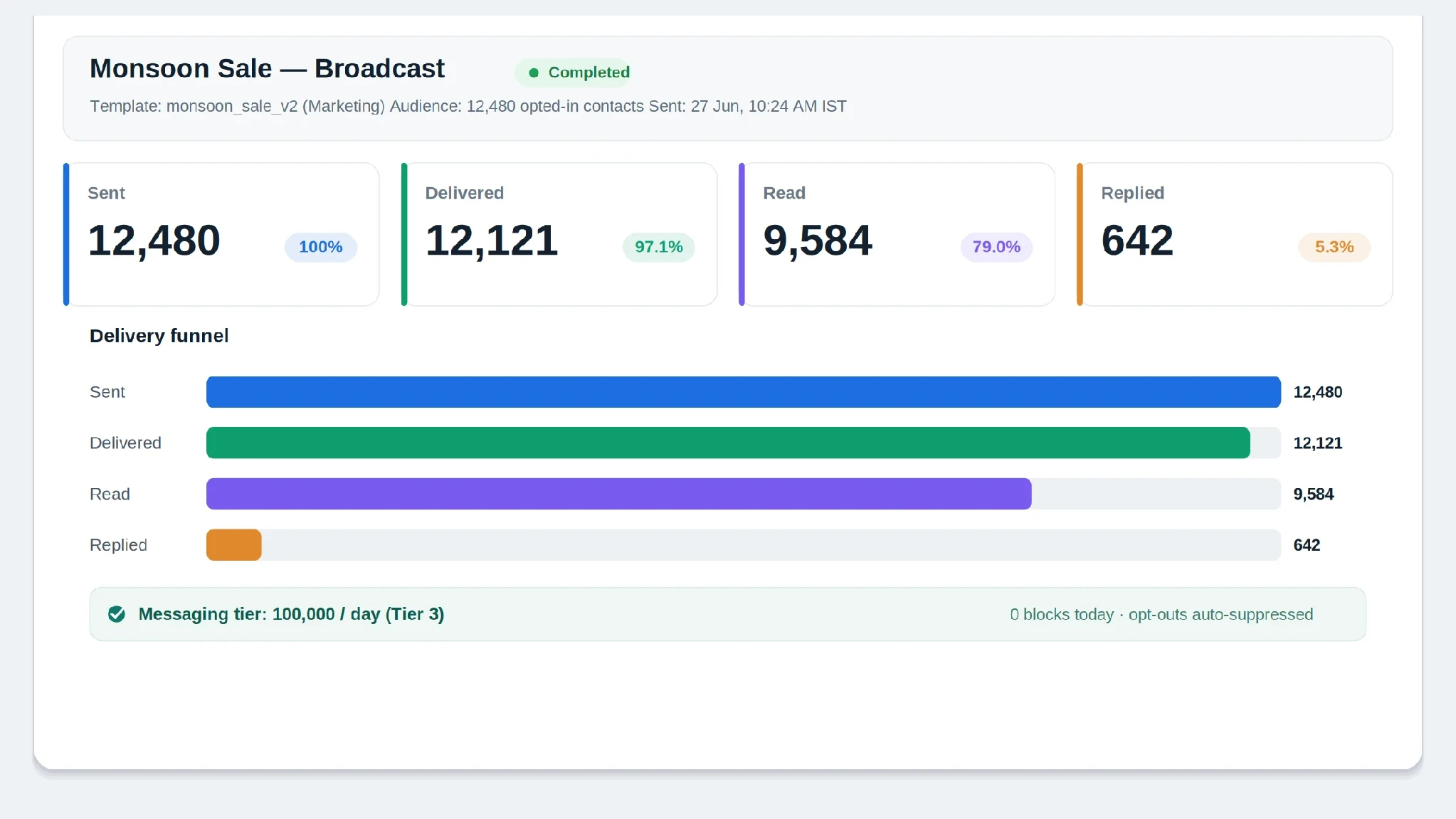
- Delivery analytics — sent, delivered, read, and replied rates per campaign
- Reply handling — an inbox for manual replies, or AI automation for high-volume campaigns
- Opt-out management — automatic suppression of STOP contacts from future sends
What happens when customers reply
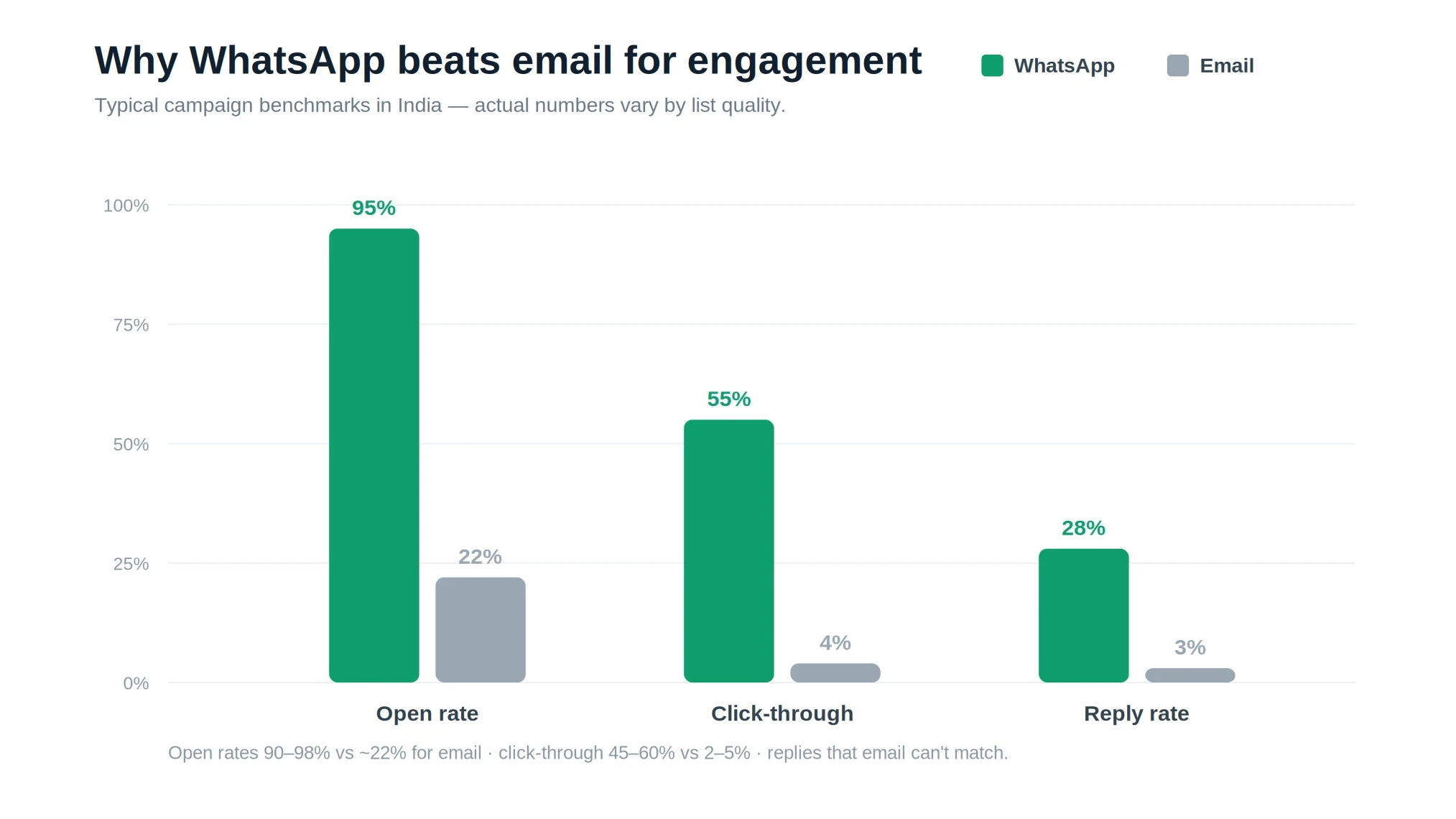
This is where most bulk platforms fall down. Your broadcast goes to 10,000 people; even a 5% reply rate is 500 conversations your team now has to handle. Without a plan, that backlog creates a worse experience than not sending at all.
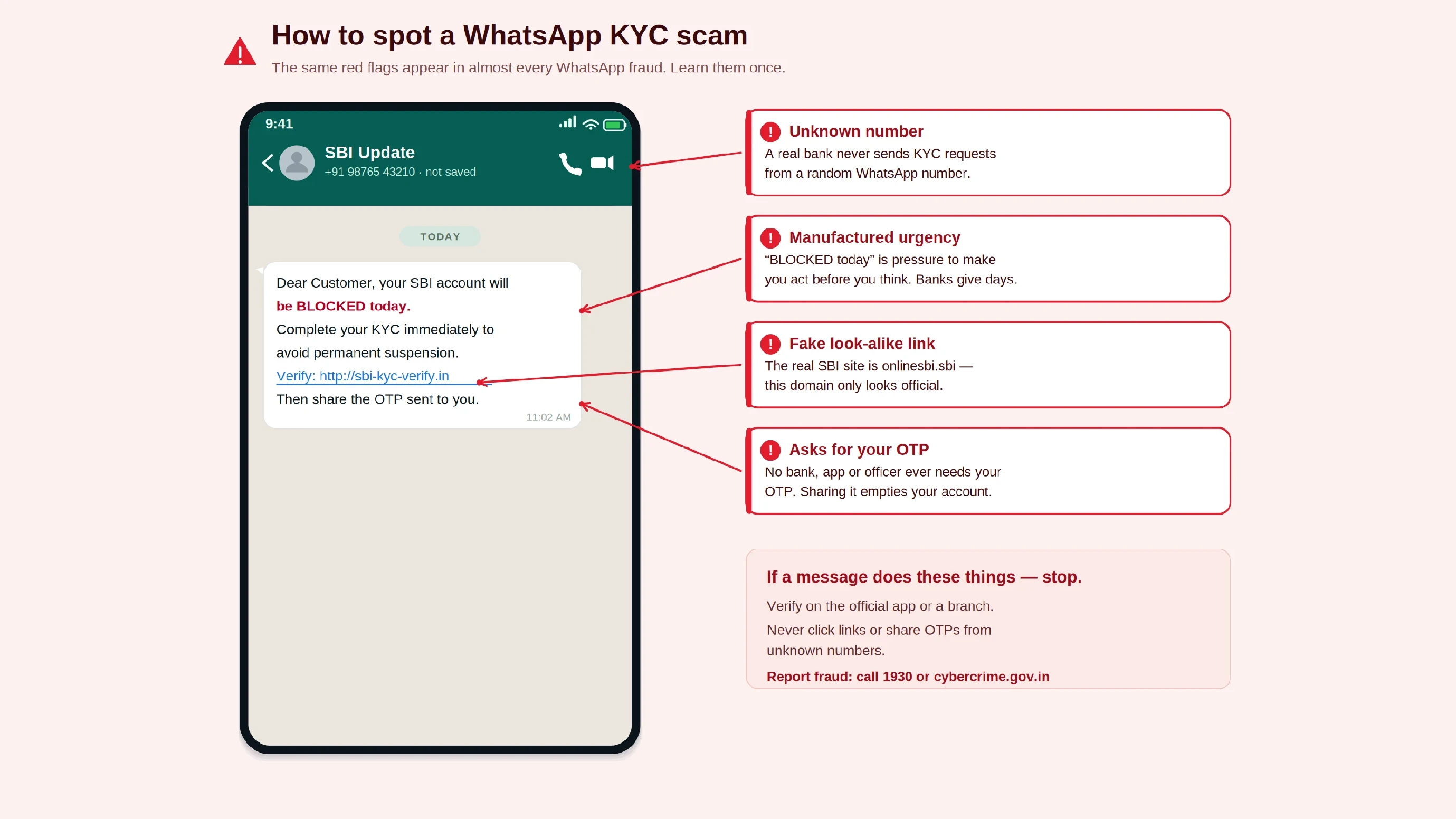
The right architecture treats broadcasting and conversations as the same product. When a customer replies, agentic AI picks up the thread, answers from your product knowledge base, and escalates to a human only when the conversation genuinely needs one. SMSLocal connects broadcasting and the inbox so every reply is handled automatically, at any volume. Good WhatsApp marketing and good support are the same discipline — and getting it wrong is also how businesses fail to protect your customers from impersonation and confusion during high-volume campaigns.